Editor-only checks for Unity Localization and TMP. It tells you before you build.
$35
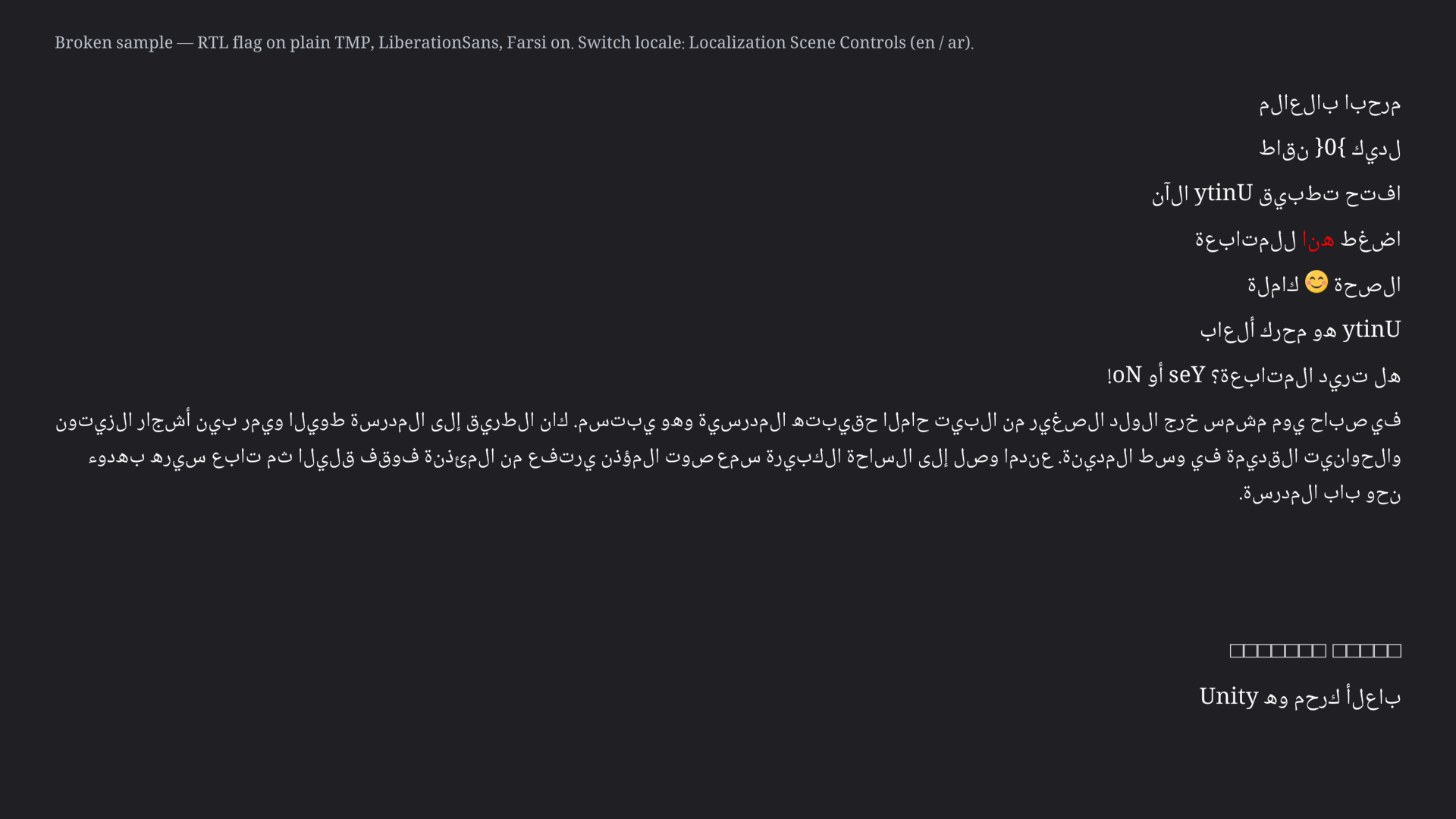
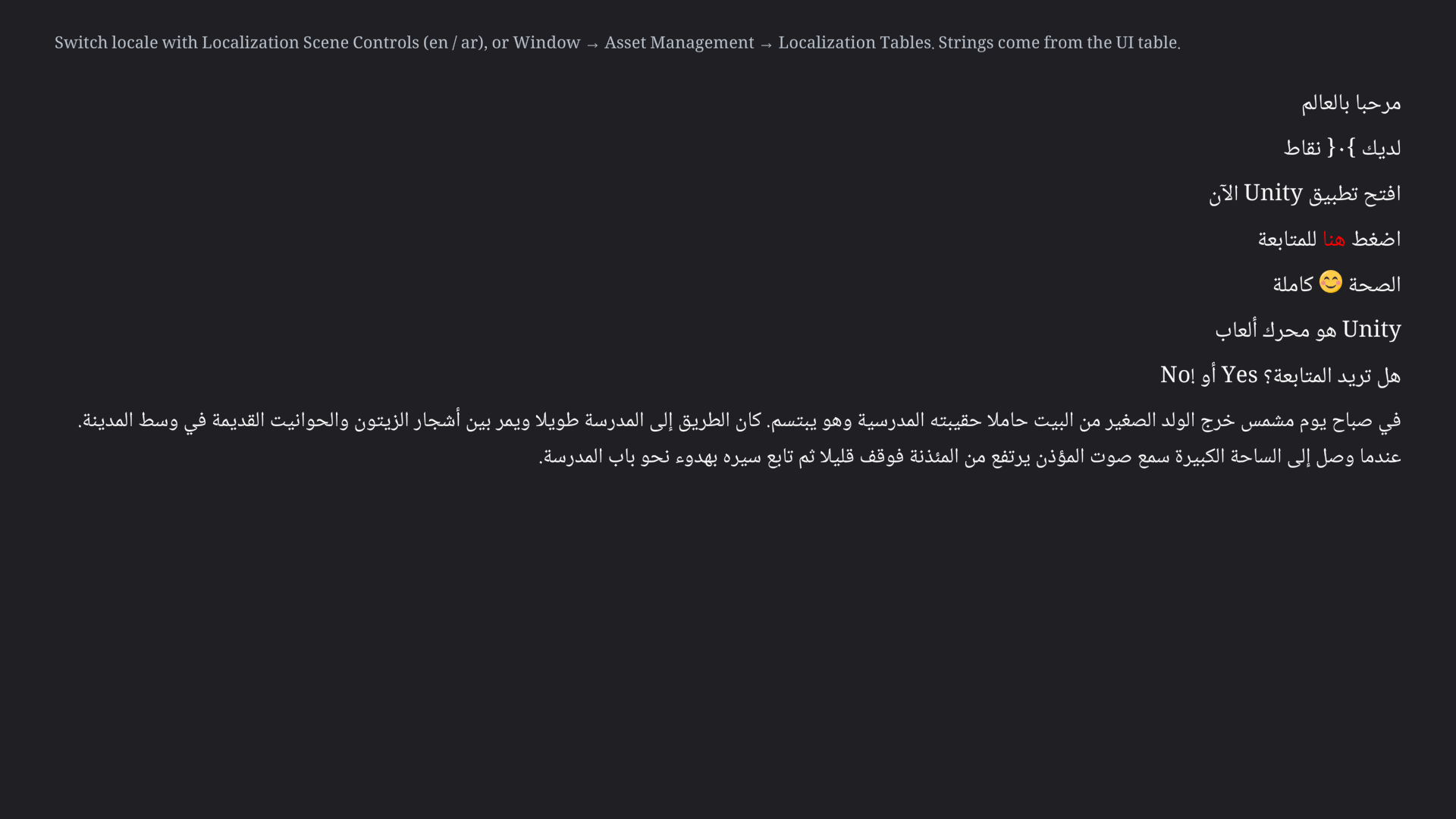
Broken sample. Arabic letters sit unjoined and isolated. Latin runs are painted backwards: Unity reads as ytinU.Correct sample. Letters join. Latin runs read Unity, not ytinU.
Checks
Id
When it fires
What to do by hand
RKLP-001
No settings.json under Addressables.BuildPath (Editor: Library/com.unity.addressables/aa/<platform>/). Player will log Did you build the Addressables? and SelectedLocale is null.
Addressables window → Build → New Build → Default Build Script. Then rebuild the player.
RKLP-002
An RTL locale exists (ar, he, fa, ur, …) and no supported shaper was detected. This check probes for the type RTLTMPro.RTLTextMeshPro only; if you use a different Arabic shaper (for example Konash Arabic Support), this check does not see it. TMP will not join letters.
Add a third-party shaper, or disable this check under Edit > Project Settings > Runekit Localization Preflight. Ticking isRightToLeftText is not a shaper. This tool will not add one.
RKLP-003
A plain TextMeshProUGUI (not RTLTextMeshPro) has isRightToLeftText = true. The flag does not change TMP_Text.text. Latin runs paint reversed (Unity → ytinU). Fires even if RTLTMPro is installed elsewhere in the project.
Uncheck the flag, or put a shaper on that object. Clearing the flag does not make Arabic correct.
RKLP-004
RTLTMPro Farsi = true (the component default) while an Arabic locale exists. في becomes فى; digits become U+06F7.
On each RTLTextMeshPro, uncheck Farsi.
RKLP-005
RTLTMPro ForceFix = false and an RTL-locale table entry starts with a Latin letter (example key: UI/T6). Shaping is skipped for that string.
Enable ForceFix on the component.
RKLP-006
The TMP font has no presentation-form glyphs (U+FE70–U+FEFF / U+FB50–U+FDFF). Static fonts error. Dynamic fonts with a source TTF are reported with that distinction.
Use a font that contains Arabic (and presentation forms if you use a shaper), or a dynamic atlas whose source TTF has Arabic.
RKLP-007
A string table entry is empty or missing for a locale.
Fill the cell in the Localization Tables window.
RKLP-009
An RTLTextMeshPro is enabled while the selected locale is not RTL (en, …). English paints with its clauses swapped. Inapplicable without RTLTMPro or without a non-RTL locale. Quiet when the selected locale is RTL.
Disable the component while the LTR locale is selected, or split LTR/RTL objects and drive them from the selected locale (Correct sample).
Each check can be disabled or have its severity overridden under Edit → Project Settings → Runekit Localization Preflight.
Preflight window
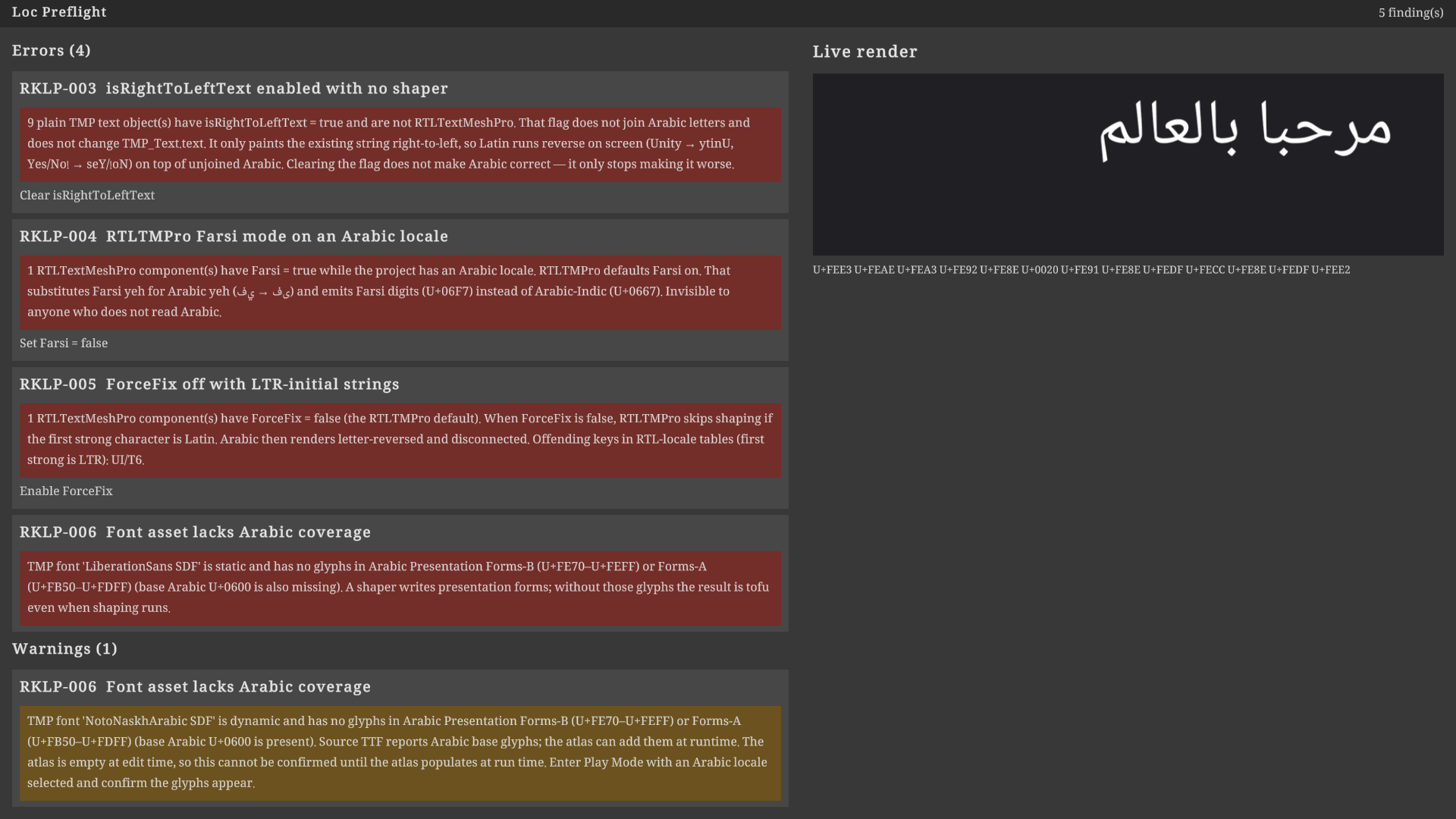
Open Window → Runekit → Localization Preflight. The window lists findings with ping and one-click fix.
Preflight window. Findings with one-click fix, plus a live TMP render and codepoint dump.
Live preview
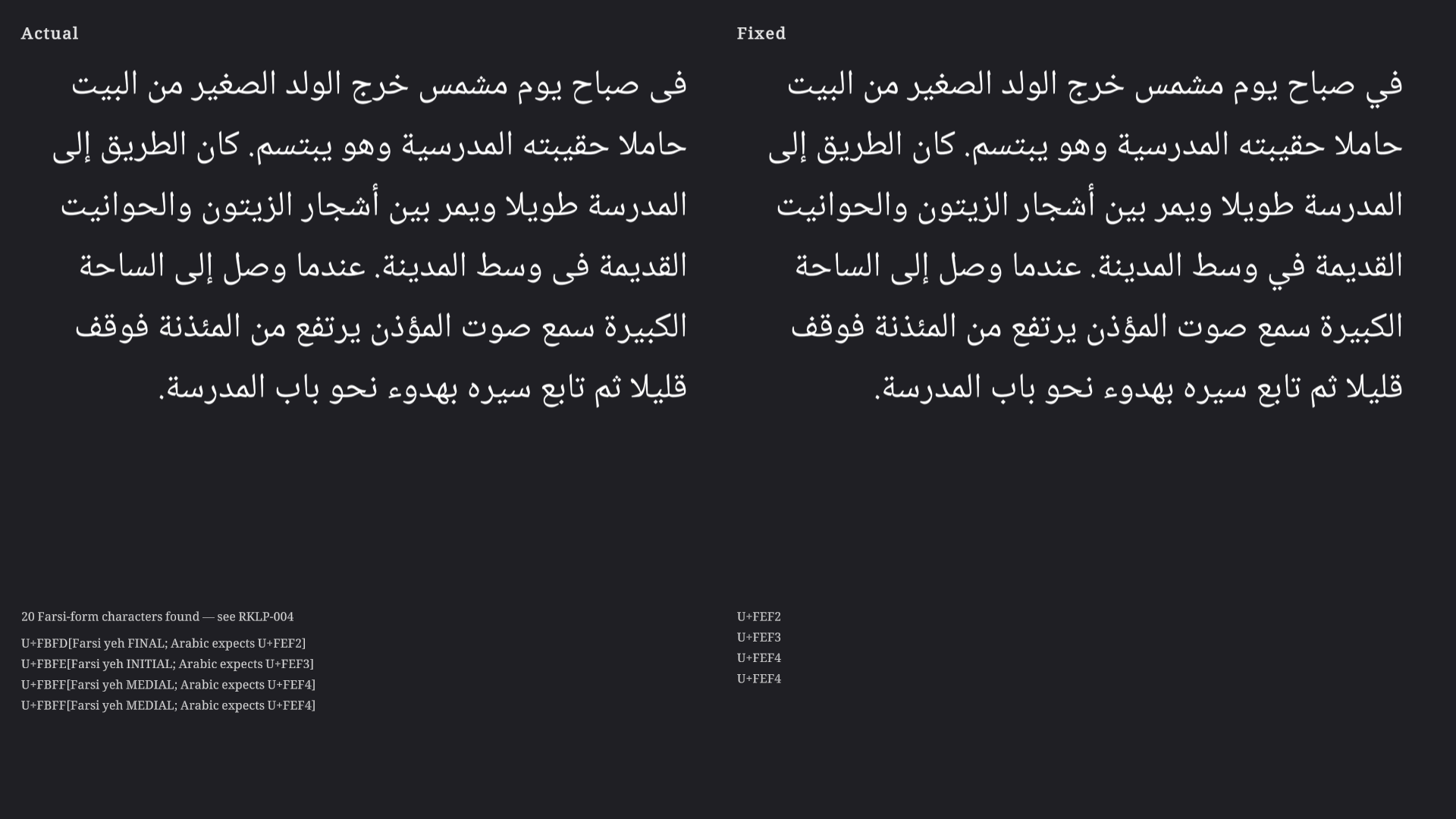
The Preflight window renders the selected table key through a real TextMeshPro (or RTLTextMeshPro3D if that type exists). It assigns the localized string to .text and dumps the resulting codepoints. Word wrapping is on; the camera keeps a minimum glyph size and a zoom slider persists in EditorPrefs. For Arabic locales the dump flags Farsi yeh forms (U+FBFC–U+FBFF), Farsi/Urdu digits (U+06F0–U+06F9), and unshaped U+0600–U+06FF.
Live TMP preview with an Actual/Fixed mode switch and codepoint dump.
CSV window
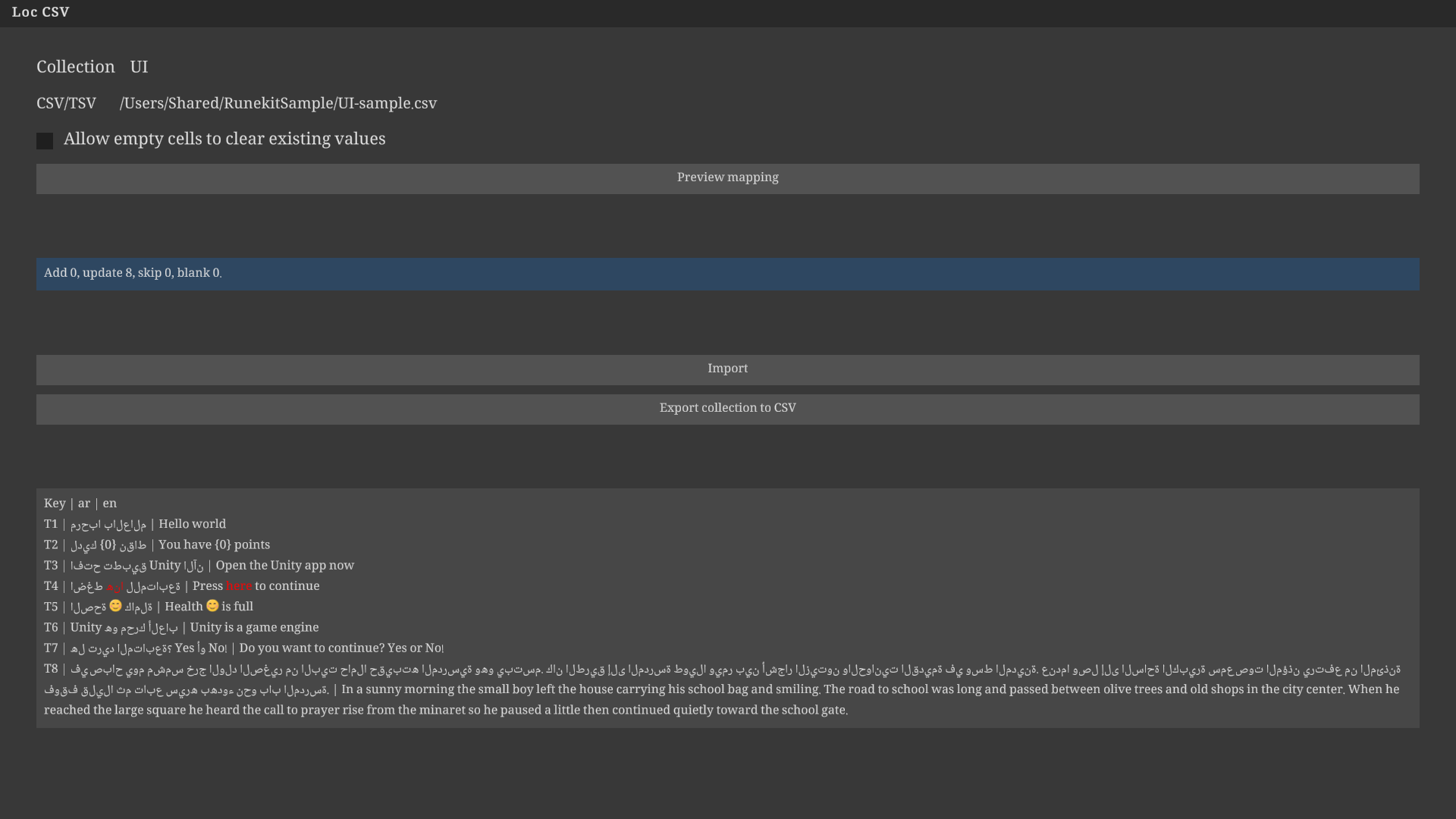
Window → Runekit → Localization CSV. First column is the key. Later columns are locale codes from the header. UTF-8 with or without BOM. Quoted commas and newlines are kept. RTL characters and directional marks are not stripped. Preview add/update/skip counts before writing. Export writes the collection back to CSV.
No network. No Google Sheets.
CSV window. Preview add/update/skip counts before writing.
Build hook
Same settings page, Build hook: Warn (default), Block, Off. Warn logs the failing check ids. Block throws BuildFailedException with those ids. Off skips the hook.
Verified on
Unity 6000.3.22f1 and 6000.5.9f1, com.unity.localization 1.5.12, com.unity.addressables 2.9.1.
Limits
This package deliberately ships no shaper. It does not distribute RTLTMPro. Noto Naskh Arabic is included under the SIL Open Font License 1.1.
Install
Copy Assets/Runekit/LocalizationPreflight/ into your project. Requires Unity Localization and Addressables (Localization already pulls Addressables). Open Window → Runekit → Localization Preflight.
The editor assembly is Editor-only. RTLTMPro is optional. If it is absent, RTLTMPro-specific checks report not applicable. This package does not reference RTLTMPro’s assembly.
Include Unity Editor version, operating system, package name and version, what you did, what you expected, and what happened.
Not for sale until the Unity Asset Store lists it. There is no buy button on this page.
Notes
Surviving domain reload
When the Editor recompiles scripts, it unloads the managed AppDomain and creates a new one. Static fields reset. Instance fields reset unless Unity serializes them. Public fields and [SerializeField] fields on MonoBehaviour, ScriptableObject, and EditorWindow are written out before the unload and restored after. Private fields without that attribute, dictionaries, and most generics are not. OnEnable runs on the new instance, which is the place to rebuild caches. Statics belong in InitializeOnLoadMethod or AssemblyReloadEvents.afterAssemblyReload, not in a field initializer that you treat as process-lifetime. Subscribe to AssemblyReloadEvents.beforeAssemblyReload if you hold a native handle that must be released. A tool that forgets its foldouts after a compile is a missing [SerializeField].
SerializedObject versus direct field editing
Assigning target.speed = 4 in OnInspectorGUI writes the C# field and skips Unity's serialization path. Undo is not recorded. The prefab override bar does not update. Multi-object edit applies to whichever target you picked, not to serializedObject.targetObjects. The SerializedObject copy of the data is now stale, so the next PropertyField draws the old value and fights you. The inspector path is serializedObject.Update(), then SerializedProperty, then ApplyModifiedProperties(). That marks the asset dirty, records undo, and keeps prefab modifications. FindProperty takes the serialized field name. On Unity engine types that is often m_Name. On your scripts it is the C# field name, including a private [SerializeField] field. A custom Editor should not mix both styles in one OnInspectorGUI.
EditorWindow state across assembly reloads
EditorWindow is a ScriptableObject. Unity serializes the open window into the layout. Public fields and [SerializeField] fields restore after a domain reload. Private fields, Dictionary, Action, and a UnityEngine.Object held only in a C# reference do not. Keep the instance ID in a [SerializeField] int and resolve it with EditorUtility.InstanceIDToObject in OnEnable. GlobalObjectId still resolves after a reimport, which a raw instance ID may not. Statics on the window class are empty after reload. Rebuild those caches in OnEnable or AssemblyReloadEvents.afterAssemblyReload. Use SessionState for values that should last for this Editor process but should not live in the layout asset. Use EditorPrefs for settings that should last after the Editor quits. Destroy editor-only Texture2D and RenderTexture in OnDisable.